
Here is something that happens way too often. A business runs fine for months. Nobody thinks about the network. Then one morning everything stops working and suddenly it is an emergency. The fix ends up costing thousands of dollars and takes days to sort out.
That whole situation could have been avoided.
Good networking best practices are not about being paranoid or spending a fortune on equipment. They are about running things properly so your business does not fall apart over something preventable. Let me walk you through what actually matters in 2026.
Why This Stuff Actually Matters Now
Networks are more complicated than they used to be. Five years ago, most US businesses had a simple setup. A few computers, one router, maybe a server in the back. That was it. Now you have remote workers connecting from home. Cloud apps running everything from payroll to customer service. Phones, tablets, smart devices all joining the same network.
More connections mean more things that can go wrong. It also means more ways for someone with bad intentions to get in. IT networking has gotten harder. The businesses that take it seriously stay ahead of problems. The ones that ignore it until something breaks end up paying for it in the worst way possible.
If setting this up feels like too much to handle internally, the team at Bit Code Solution helps businesses get their network infrastructure sorted out properly.
1. Write Everything Down
Most IT teams hate documentation. Most IT teams also waste hours troubleshooting problems that would take twenty minutes if someone had just written things down. Every device on your network should be recorded somewhere. What it is, where it sits, what IP address it uses, how it is configured. All of it.
A new person joins the team? They should be able to read your documentation and understand the whole setup without bugging anyone. Something breaks at 2am? The person fixing it should not have to guess what is connected to what.
Start with a simple spreadsheet if that is what you have. Something is always better than nothing. As things grow, move into proper network management software that keeps everything organized in one place.
2. Stop Putting Everything on One Network
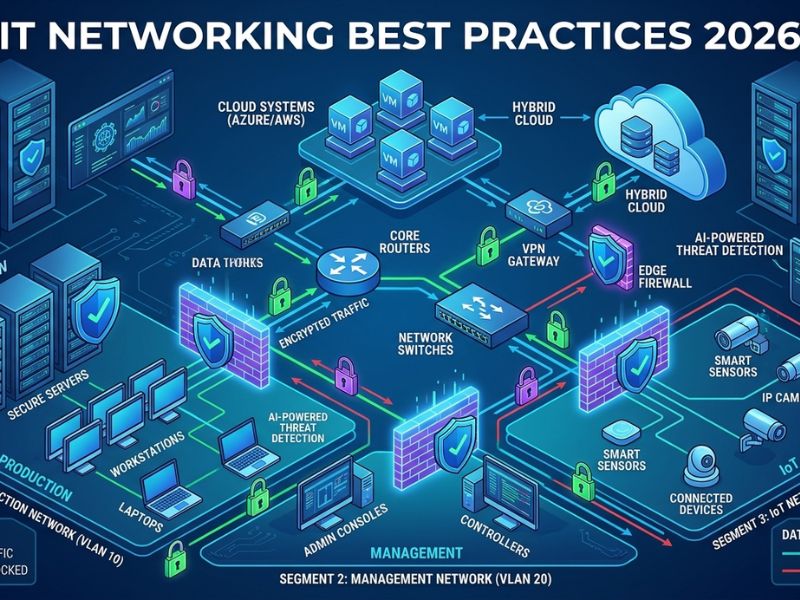
This is one of the most common mistakes I see with smaller businesses. Everything on one flat network sounds simple. And it is simple, until something goes wrong. Then that simplicity becomes a disaster. One infected device can talk to every other device. One breach becomes a company-wide breach.
Network segmentation fixes this. You split your network into separate sections. The finance team is on their own segment. Guest WiFi is completely separate. Servers are isolated from everyday office traffic.
When something goes wrong in one area, it stays in that area. The rest of your operation keeps running. This is one of those networking best practices that costs very little to set up but saves enormous amounts of money when things go sideways.
3. Control Who Gets Access to What
Not everyone in your company needs access to everything. Your marketing coordinator does not need to be in your financial systems. Your receptionist does not need access to your server configurations. Give people access to what they need for their job. Nothing more.
This is called least privilege and it is one of the most effective things you can do for your security without spending any money. Set up roles. Assign permissions based on those roles. When someone leaves the company, remove their access that same day. Not next week. That day.
Also, turn on multi-factor authentication for anyone logging into sensitive systems or connecting remotely. A password alone is not enough anymore. It has not been enough for a while.
4. Update Things Before They Become a Problem
Old software is a gift to hackers. A huge number of network breaches across the US happen because a patch was available for months and nobody bothered to install it. The attackers knew about the vulnerability. They just waited for companies that were not paying attention.
Your routers, switches, firewalls, servers, and computers all need regular updates. Set a schedule. Stick to it. Automate what you can so updates happen overnight when nobody is working. This is honestly one of the simplest networking best practices on this list. It requires no special skills and almost no budget. It just requires someone making it a priority.
5. Watch What Is Happening on Your Network
You cannot fix a problem you do not know exists. Network monitoring means you have visibility into your own infrastructure. You can see when traffic spikes in a weird way. You can see when a device that should not be there tries to connect. You can catch a failing switch before it takes down a whole department.
Good network management is not just about setting things up and walking away. It is about keeping an eye on things so small issues get caught before they turn into expensive ones.
For bigger companies, this means a full monitoring setup with alerts and dashboards. For smaller teams, there are affordable tools that send you a text or email when something looks off. Either way, you need visibility.
6. Back Everything Up and Actually Test It
Everyone says they have backups. Not everyone actually tests them. An untested backup is just a file sitting somewhere that you hope works. Until you restore from it and confirm it works, you do not actually know.
Back up your data, your configurations, your system images. Store copies in more than one place. On-site and off-site. Cloud storage adds another layer that most businesses should already be using.
Then run a test restore. Do it a couple times a year. Make sure the backup actually produces something usable. This one habit has saved businesses that would otherwise have lost everything.
7. Take Your WiFi Security Seriously
A lot of businesses lock down their wired network and completely neglect their wireless setup. The moment you set up any new device, change default router credentials. You can find the default usernames and passwords for a hosting in different places online. Leaving them intact is like leaving your front door wide open.
If possible, employ WPA3 encryption with your devices, which is the latest wireless security standard recommended by organizations like Wi-Fi Alliance. WPA2 is still okay for now but I have started planning to upgrade. Set up a separate network for guests and personal devices. Do not let someone’s personal phone sit on the same network as your business systems. That is a simple separation that reduces your risk significantly.
For employees working remotely, use a company VPN. Home networks and coffee shop WiFi are not your networks. You have no control over them. A VPN gives your remote staff a secure way to connect to company resources no matter where they are.
8. Train Your People
The strongest IT networking setup in the world can be undone by one person clicking a bad link in an email. This is not an exaggeration. Human error is one of the leading causes of network security incidents in the US. Phishing emails look real. Social engineering works on smart people, which is why organizations like CISA warn businesses about human-related security risks.
Regular training does not have to be a whole production. Short sessions work fine. Show people what a phishing email looks like. Tell them what to do if something seems off. Make it easy to report suspicious stuff without feeling embarrassed.
Build this into your company culture. Not as a one-time training that people forget two weeks later. As an ongoing conversation.
9. Build for Where You Are Going, Not Just Where You Are
When a network is built for 15, it often collapses at 40. So, as you are setting this up, think about where your company is going. Select the gear that evolves with you. Design the architecture of the network keeping the future in mind.
Down the road, this makes network management so much easier. When you know what you have and it is built to scale, adding new users or locations is straightforward. When nothing is planned properly, growth turns into chaos every single time.
Businesses that want to grow without constantly rebuilding their infrastructure often work with teams that specialize in scalable setups. Bit Code Solution helps companies build networks that actually keep up with growth instead of becoming a bottleneck.
10. Audit Your Network Regularly
Things drift. Someone adds a device without telling IT. An old employee account stays active. A permission that made sense last year does not make sense anymore.
A network audit is just sitting down and checking that your actual setup matches what you intended. Go through connected devices. Review access permissions. Check for outdated software. Look for everything that must not be there.
Do this at least once a year. Twice is better. It is one of those networking best practices that takes a day but saves you from problems that could take weeks to clean up.
Frequently Asked Questions
1. What networking best practices should small businesses focus on first?
Keep a backup plan ready with regular updates and access controls. If you do just those three things, you’ll be protected from the most common hiccups of small businesses.
2. How often should network management be reviewed?
Once a year at minimum. Quarterly is better if you have the bandwidth for it. Things change faster than most people realize.
3. What is the most common IT networking mistake businesses make?
Not documenting anything. When nobody knows how the network is set up, every problem takes way longer to fix than it should.
4. Do small businesses actually need monitoring tools?
Yes. Rather having a basic mechanism that can trigger alerts when things aren’t right than having angry employees tell you the network has been down for an hour.
5. How do networking best practices connect to cybersecurity?
They are deeply connected. Segmentation, access controls, and regular patching close the specific doors that attackers use most often. Good networking is good security.
Conclusion
None of this is complicated. It is just easy to put off until something forces your hand. The businesses that follow solid networking best practices are not doing anything magical. They are just staying consistent. They document things. They keep software updated. They watch what is happening on their network. They train their people.
Those habits stack up over time and the difference between a business that handles IT well and one that is constantly fighting fires usually comes down to those basics. If you want help getting your network in good shape or just want someone to look at what you have and tell you where the gaps are, Bit Code Solution is worth reaching out to.
