Ask five companies what they paid for NetSuite, and you may hear five very different answers.
One business might say its first-year cost was manageable because it only needed core financials, a handful of users, and a simple migration from QuickBooks. Another might describe a six-figure investment involving multiple subsidiaries, warehouse management, ecommerce integrations, custom workflows, and weeks of testing.
Both can be telling the truth.
That is because NetSuite is not priced like a basic software subscription where every customer pays the same monthly fee. It is a modular ERP system, and the total cost depends heavily on what the business needs the system to do. For growing companies, this flexibility is one of NetSuite’s biggest strengths. But it also explains why budgeting can feel confusing at first.
To understand why NetSuite pricing varies by implementation scope, you need to look beyond licenses and focus on the users, modules, processes, integrations, data, and customization required to make the system work for your business.
NetSuite Pricing Is Built Around Business Complexity
NetSuite is designed to support businesses at different stages of growth. A small service company may only need core accounting, reporting, basic CRM, and a few administrative users. A larger distributor may need inventory management, warehouse workflows, purchasing, demand planning, ecommerce connections, and multi-location reporting.
Those two companies are not buying the same system in practice.
They may both use NetSuite, but the configuration, timeline, and technical requirements are completely different. That is why a simple implementation may fall into a lower-cost range, while a complex, multi-module rollout can require a much larger budget.
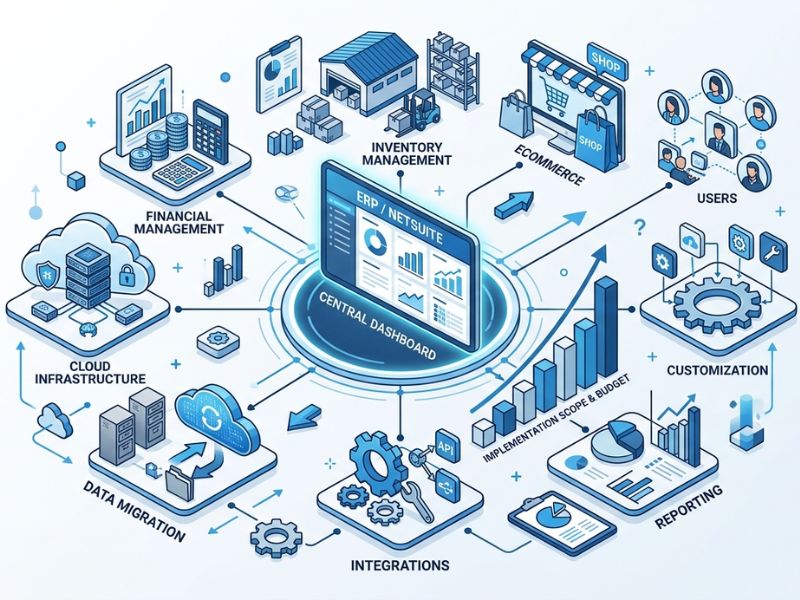
In most cases, NetSuite pricing includes several major components:
- Base platform subscription
- User licenses
- Add-on modules
- Implementation services
- Data migration
- Integrations
- Customization and automation
- Training and support
Each piece affects the final cost. The more business processes NetSuite needs to handle from day one, the larger the scope becomes.
User Count and Access Levels Affect Recurring Costs
User licenses are one of the most visible parts of NetSuite pricing. A company with 10 users will naturally spend less than a company with 100 users, but the number of users is only part of the story.
Access level matters too.
Not every employee needs full access to the entire ERP system. Some users may need complete access to financials, reporting, approvals, or operational workflows. Others may only need limited access for basic tasks, time entry, expense submission, or approvals.
This is where smart planning can prevent unnecessary recurring costs. Instead of assigning full-access licenses across entire departments, companies should map users to actual roles and workflows. A controller, warehouse manager, sales operations lead, and executive each need different levels of visibility and control.
Over-licensing can quietly inflate the annual subscription. Under-licensing, on the other hand, can create bottlenecks once the system goes live. The goal is to match access to real work, not guess based on job titles alone.
Modules Can Change Both Software Cost and Implementation Cost
Modules are another major reason NetSuite pricing varies.
A company that only needs core financial management will have a very different subscription and implementation scope than a company adding advanced inventory, warehouse management, manufacturing, revenue recognition, SuiteCommerce, or SuitePeople.
Modules increase software cost, but they also increase implementation effort. That is the part many businesses underestimate.
For example, adding warehouse management is not just a licensing decision. It may require warehouse process mapping, barcode scanning workflows, pick-pack-ship configuration, inventory rules, employee training, testing, and integrations with shipping platforms.
The same applies to manufacturing, demand planning, advanced revenue recognition, ecommerce, or multi-entity consolidation. Each module introduces more decisions, more configuration, and more testing.
That is why companies should separate “must-have at launch” from “nice-to-have later.” A phased rollout often creates a smoother implementation and a more controlled budget.
Implementation Scope Is Where Costs Can Expand Quickly
Implementation scope is often the biggest variable in the first-year NetSuite investment.
A basic implementation may involve standard financial setup, a simple chart of accounts, a limited number of users, and minimal customization. A more advanced project may involve multiple entities, legacy system cleanup, custom approval workflows, third-party integrations, industry-specific reporting, and complex data migration.
That difference matters.
Implementation teams usually need to handle discovery, requirements gathering, configuration, role setup, data cleanup, migration, integrations, testing, training, and go-live support. Each area requires time and expertise.
This is where many businesses begin to understand why NetSuite pricing varies by implementation scope. The final investment often comes down to how much work is required to make the ERP fit the company’s real operations.
A company with clean data, standard processes, and limited integrations will usually have a simpler path. A company with years of messy spreadsheets, disconnected software, manual workarounds, and unique approval rules will need more implementation effort. That practical difference is one of the clearest examples of why NetSuite pricing varies by implementation scope.
Data Migration Can Be Simple or Surprisingly Complex
Data migration sounds straightforward until the project begins.
Moving customers, vendors, items, transactions, open balances, and historical records into NetSuite requires careful planning. The cleaner the data, the easier the process. The messier the data, the more time is needed for cleanup, mapping, validation, and reconciliation.
Many companies discover duplicates, outdated records, inconsistent naming conventions, incomplete fields, or old transactions that no longer match current processes. These issues must be resolved before data can be trusted in the new ERP system.
The scope also depends on how much historical data the business wants to bring over. Migrating open balances and active records is far simpler than migrating years of transaction history.
This is why data migration should never be treated as a small technical task. It affects reporting accuracy, user confidence, go-live readiness, and long-term system value.
Integrations Add Value, But They Also Add Scope
Most growing businesses do not run on one system alone. They may use ecommerce platforms, CRM tools, payroll software, warehouse systems, tax tools, shipping apps, payment processors, business intelligence platforms, or industry-specific applications.
Connecting these systems to NetSuite can create huge operational value. It reduces duplicate entry, improves visibility, and keeps teams working from consistent data.
But integrations also increase implementation scope.
Each integration requires decisions about data flow, ownership, timing, error handling, field mapping, and testing. A simple one-way integration is usually easier than a two-way integration that updates records across multiple systems.
For example, connecting an ecommerce store to NetSuite may require syncing customers, orders, inventory, payments, fulfillment status, refunds, and tax details. That is much more complex than simply exporting a daily sales report.
The more systems involved, the more careful the implementation must be.
Customization Should Solve Real Business Problems
One of NetSuite’s advantages is that it can be customized through workflows, scripts, forms, dashboards, reports, roles, and integrations. This flexibility helps businesses replace manual processes and support unique operational needs.
But customization should be approached carefully.
Not every preference needs a custom build. Sometimes, changing a process slightly to align with NetSuite’s standard functionality is faster, cheaper, and easier to maintain. Other times, customization is justified because it supports a critical workflow, compliance requirement, approval process, or customer experience.
The key is to distinguish between “we prefer it this way” and “the business cannot operate effectively without this.”
Uncontrolled customization can increase implementation cost, delay go-live, and create long-term maintenance challenges. Well-planned customization, however, can make NetSuite significantly more valuable.
Training and Change Management Are Part of the Real Cost
ERP implementation is not only a software project. It is also a people project.
Employees need to understand how their daily work will change. Finance teams may need new close procedures. Warehouse teams may need new scanning workflows. Sales operations may need new order processes. Executives may need new dashboards and reporting habits.
Without proper training, even a well-configured system can struggle.
Change management includes user training, process documentation, testing support, stakeholder communication, and post-go-live assistance. These activities may not sound as technical as integrations or custom scripts, but they are essential for adoption.
A company that invests in training usually gets more value from NetSuite faster. A company that skips it may face confusion, workarounds, and delayed ROI.
Phased Implementation Can Help Control Budget and Risk
Many companies try to do too much at once. They want every module, every integration, every report, and every automation live on day one.
That approach can work for some organizations, but it often increases cost and risk.
A phased implementation is usually more practical. The first phase may focus on core financials, essential operational workflows, key users, and required reporting. Later phases can add advanced inventory, warehouse management, revenue recognition, ecommerce, planning tools, or deeper automation.
This approach gives the business time to stabilize before adding more complexity. It also helps teams learn the system, refine processes, and make smarter decisions after go-live.
In other words, phasing does not mean thinking small. It means building in the right order.
What Businesses Should Budget For Beyond Year One
The first-year cost of NetSuite typically includes subscription and implementation. But the total cost of ownershipextends beyond launch.
Companies should also budget for ongoing support, new users, additional modules, optimization, integration maintenance, reporting improvements, and future process changes. This long-term view also explains why NetSuite pricing varies by implementation scope rather than following a single flat-rate model.
As the business grows, NetSuite may need to support new entities, new markets, higher transaction volume, additional departments, or more advanced compliance requirements. That is normal. ERP should evolve with the company.
The mistake is treating go-live as the finish line. In reality, go-live is the beginning of a more scalable operating model.
How to Plan a More Accurate NetSuite Budget
A better NetSuite estimate starts with scope clarity. Before requesting pricing, businesses should define what they need the system to accomplish.
Important questions include:
- Which processes must be live on day one?
- How many users need access, and what type of access do they need?
- Which modules are required now versus later?
- What systems need to integrate with NetSuite?
- How clean is the company’s current data?
- Are there multiple entities, currencies, warehouses, or subsidiaries?
- What reports and dashboards are critical?
- How much customization is truly necessary?
- Who will own testing, approvals, and training internally?
The clearer these answers are, the more realistic the budget will be. They also make it easier to explain internally why NetSuite pricing varies by implementation scope and why a carefully planned rollout is usually more predictable than a rushed one.
In Summary: Build Your NetSuite Budget Around Scope, Not Guesswork
NetSuite pricing varies because businesses vary.
A lean implementation for a small finance team will not cost the same as a multi-entity, multi-module rollout with complex integrations and custom workflows. The software is flexible enough to support both, but that flexibility means pricing depends on scope.
For business leaders, the smartest move is not to look for a universal price tag. It is to define the business case, prioritize essential workflows, phase the rollout wisely, and budget for the full lifecycle of the system.
When planned well, NetSuite is more than an ERP expense. It becomes the operational backbone that helps a growing company move faster, make better decisions, and scale with fewer bottlenecks.