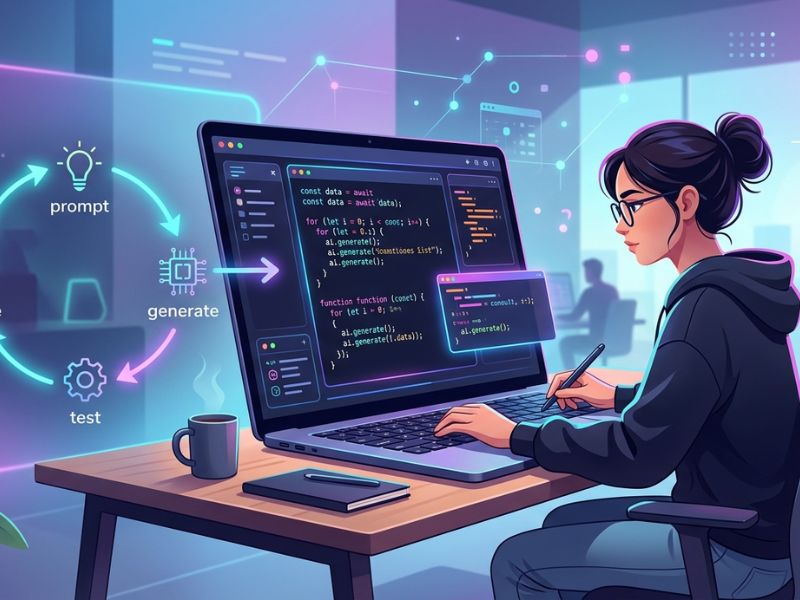
Modern software development is changing fast. One new idea that many developers talk about today is vibe coding. But many people still ask two simple questions: what is vibe coding, and how does vibe coding work?
In simple terms, vibe coding is a development method where developers guide AI tools using prompts. The code is either written or edited by the AI. Instead of manually typing every line of code, the developers define the goal, and AI does most of the coding.
The developer must check the code, run tests, and manage the final deployment; however, the developer is not responsible.
This guide explains the full vibe coding workflow. You will learn how the prompt loop works, how apps move from idea to release, and how vibe deploying helps ship projects faster.
The Mental Model: You Direct, AI Implements, You Verify
To understand how vibe coding works, it helps to think about a simple mental model. In vibe coding, you guide the process. The AI writes the code. Then you review and test the results.
This process is very different from traditional coding. Normally, developers write each line of code themselves. They plan the logic and type everything manually. In contrast, what is vibe coding really about? It is about describing your idea and letting AI generate the code.
In the beginning, you will explain your idea. It could be a web page, a tiny app, or an option in a system. You define the objectives using prompts. These prompts communicate to the AI what the project should do.
The AI then generates the code according to your specifications. A lot of modern tools can edit several files at once. This is known as multi-file edits, which makes the process faster.
The developer nevertheless plays a key role. You need to review code, verify the logic, and run tests. While AI generates code rapidly, it can still produce errors. That is why verification is important.
The whole process works like a loop. You prompt the AI, get results, test them, and improve the instructions. This iteration loop continues until the feature works correctly.
This simple model explains the vibe coding workflow. You decide where things are headed, and the AI does the heavy coding, and you verify it all works before moving forward.
If you want a complete beginner-to-advanced explanation of this concept, check our detailed Vibe Coding Article. It covers the basics, workflow steps, tools, and real examples to help developers start building faster with AI.
The Code-Level Loop (Step-by-Step)
At the heart of how vibe coding works is a repeating process called the prompt loop. This loop allows developers to build features in a step-by-step manner with the help of AI tools.
Rather than manually coding, you describe your desired outcome and allow the AI to suggest solutions. Then you confirm, assess, and fine-tune them. This process repeats many times during development. Let’s break down the core steps of this loop.
Describe the Goal
Every vibe coding workflow starts with a clear goal. Before you ask AI to write code, you need to explain what you want to create.
This instruction is written as a prompt. A prompt technique may refer to a feature, a bug fix, or a new tool. You may request the AI to create a login form or even create an API endpoint, for example.
Clear prompts produce better results. That is why many teams prepare structured documents first. These documents often include a PRD (Product Requirements Document) and a technical design plan.
The purpose of a PRD is to describe how the users will usually interact with the feature. Provides a detailed explanation of how the system should work behind the scenes.
Another important factor is the context window. AI tools can only remember a limited amount of information at once. So developers often provide the most important files and instructions in the prompt. When the goal is clear, the AI can generate more accurate code.
Generate Code
After the goal is described, the AI begins to generate code. This is where the main power of the vibe coding workflow becomes visible.
The AI assesses your input and formulates code that suits your request’s function. It might generate new files or modify existing ones. Today’s tools can even perform edits on multiple files of a project in a single go.
For instance, it might make a backend route, modify a database model, and add a frontend component all at once.
Many developers also maintain agent docs. These documents explain project rules, coding standards, and architecture. When AI uses these guidelines, it produces better and more consistent code.
Nonetheless, the produced code cannot ever be taken at face value. Developers must read important parts of the output and confirm that the logic is correct.
This step is where the AI handles the heavy lifting while developers focus on direction and quality.
Run and Observe
After the generation of the code, it is time to run the app. This test confirms that the feature is working as expected.
Developers initiate the app locally for functional testing. Automated tests may run to monitor for errors. Early detection of problems via tests.
During this stage, developers carefully observe the results. Does the feature behave correctly? Are there errors in the console? Are there performance issues?
If there is any problem. We first need to identify. Many times, it would be a small bug. Other times, the AI misunderstood the prompt.
You should observe results because it shows how well the generated code works in the real environment. In the iteration loop, feedback is also captured here for use in the next iteration loop.
Feedback and Refine
The final step in the prompt loop is refinement. After running the code, developers give feedback to the AI.
Users may report bugs, missing features, missing functionality, or improvements. Subsequently, the AI modifies the code according to the commands given.
This back-and-forth process is what makes vibe coding powerful. Instead of rewriting code from scratch, developers improve it through repeated prompts.
Over time, the system becomes more stable and closer to the final product. The loop continues until the feature works perfectly.
The Application Lifecycle and “Vibe Deploying”
Understanding how vibe coding works also requires looking at the full application lifecycle. The process is more than just writing code. A complete project passes through several stages before reaching users.
The lifecycle typically starts with an idea. An organization’s developer or team identifies and commits to building a tool, feature, or product. At this stage, they describe the concept and prepare a basic PRD.
Next comes the design stage. Here, developers create the technical design. This plan explains the architecture, APIs, and data models needed for the project.
After planning, the vibe coding workflow begins. Developers interact with AI tools through prompts. The code, multi-file edits, and component updates are generated by AI. The developers check the output and run tests for operation. Development takes place until it is stabilised.
After the software is prepared, next comes the deployment. Traditional development includes manual steps to deploy. Developers set up servers, configure pipelines, and launch the app. In vibe coding environments, this stage is often called vibe deploying.
Vibe deployment is the use of AI-assisted workflows to rapidly move code to production. Tools powered by artificial intelligence might be able to create configuration files or set up an environment. AI can also help development teams prepare deployment scripts.
Automated pipelines like CI/CD are used by many teams. Continuous Integration verifies code modifications and executes automated tests. Code that has already been verified is pushed to the prod environment. With this automation, there are fewer human errors and faster releases.
Nonetheless, developers need to keep an eye on the application after it’s deployed. Systems subjected to extensive testing can still fail once released into production. Monitoring tools can track errors and user activities.
When a problem arises, the team returns to the iteration loop. The prompts are updated, fixes are generated, tests are run, and redeployed.
The entire lifecycle of vibe coding is explained by this cycle. The process plans include human intervention with AI assistance for project deployment. Faster and more flexible if you need to develop something.
A Structured Workflow You Can Reuse (PRD → Tech Design → Agent Docs → Build)
While vibe coding feels flexible, successful teams usually follow a structured process. A clear workflow improves results and reduces mistakes.
The first step is creating a PRD. This document explains what the product should do and why it exists. It includes user needs, feature descriptions, and success metrics.
A good PRD helps AI understand the project goals during the vibe coding workflow.
After the PRD comes the technical design. This document tells us how the system will be built. This consists of architecture diagrams, database structure, and API plans.
An efficient technical design will ensure AI tools generate better coding accuracy.
The next process is putting together agent docs. These documents help the development of AI assistants. These generally include coding standards, folder structure, naming conventions, project rules, etc.
Agent docs are essential so that the generated code remains consistent with the existing project.
The phase of building starts once the documents are ready. Developers begin generating features using prompts.
AI tools can edit multiple files, create modules, or refactor existing code. Developers run tests to verify whether the system performs correctly.
If problems occur, the programmers return to the iteration loop. They tweak prompts, adjust instructions, and create better code. Finally, the project becomes stable and ready for deployment.
To automate this stage, many teams are integrating CI. Using automated testing, developers can save their time and money.
The coded vibes will be consistent and scalable. Developers go through a set workflow, such as planning and releasing, instead of randomly. Using the same approach, teams quickly build new features but with quality intact.
Industry Best Practices for AI-Assisted Development
Many developer platforms recommend following structured practices when using AI coding workflows. For example, Google Cloud describes a development lifecycle that moves from planning and building to testing and final deployment, often supported by automated CI/CD pipelines. Similarly, teams often create structured documentation, such as agent docs, so AI tools can understand project architecture, coding rules, and system behavior before generating code. Developer platforms like Memberstack also recommend strong planning and version control practices to keep projects organized as they grow. When these best practices are combined with the vibe coding workflow, teams can move from idea to production faster while maintaining code quality and long-term maintainability.
Where Workflows Break (Context Loss, Scope Creep, Brittle Dependencies)
Even though vibe coding is powerful, workflows can still break if teams are not careful.
One common issue is context loss. AI systems rely on a limited context window. If the prompt does not include important files or instructions, the AI may generate incorrect code.
Another problem is scope creep. This happens when a project grows beyond its original goal. Developers may keep adding features without updating the plan. Over time, the codebase becomes harder to manage.
A third challenge involves brittle dependencies. Modern applications depend on many libraries and tools. If one dependency changes or breaks, the entire system can fail.
These problems can slow down the vibe coding workflow.
The solution is simple but important. Keep prompts clear, maintain updated documentation, and run automated tests frequently. With strong processes in place, teams can avoid these common failures.
Next-Step Links (Prompts, Tools, Security)
After learning what vibe coding is and how vibe coding works, the next step is exploring practical tools and techniques.
You can start by studying vibe coding prompt techniques. Better prompts lead to better code results.
Next, explore modern AI coding tools that support multi-file edits and automated workflows.
Security is also important. Always review generated code and run automated tests before deployment.
You can also explore common security risks in AI-assisted coding and learn how to avoid them with proper safeguards. Our guide on secure vibe coding guardrails explains safe prompting practices, code validation, and protection methods for AI-generated applications.
Finally, learn about CI/CD pipelines and monitoring systems. These tools help manage releases and keep applications stable after deployment. Together, these resources will help you master the full vibe coding workflow.
FAQs
What is the vibe prompt loop coding?
Vibe coding depends on the prompt loop, the most important process. Developers create prompt templates that describe a feature or change. Based on the directions, the AI produces code. Afterward, developers test and verify the results.
They will leave feedback if something requires improvement, and ask the AI to change the code. This loop continues until the feature functions correctly. The iteration loop is fundamental to vibe coding for designers and developers and is a featured activity in our Learn portal.
What is vibe deployment?
Vibe deploying means using AI-assisted workflows to release applications. To prepare every step manually is not cost-effective for developers; hence, automation tools, along with AI suggestions, are used.
These utilities assist with environment configuration, script preparation, and CI/CD integration. The purpose is to transfer code from development to production fast and safely.
Do you need to check the codes?
Affirmative. Despite AI writing code, developers should thoroughly review it. A code written by a program can be carefully examined in a process. In the case of a production-executing application, the generated code must be reviewed. AI development is quickened, but human oversight keeps it dependable.