
The software development process is transforming due to AI. Back in the day, every line of code was written by developers. Many developers use AI-assisted coding tools that help them generate code today. One of the newest trends within the coding space is called vibe coding.
Vibe coding uses an LLM(large language model) code generation tool to develop software using human language instead of normal programming languages. When you need some coding done, you tell the AI what you want to develop. It helps produce code. The developer assesses, modifies, and launches it afterwards.
This information is contained in the vibe coding guide. In addition, it explains what vibe coding is. How does vibe coding work? The tools used for vibe coding. When does vibe coding make sense? Risk you must understand. A detailed guide will help you plan for your AI development if you want to start in 2026.
Why “vibe coding” is suddenly everywhere
In the last two years, the term vibe coding has surfaced here and there on developer forums and blogs. More and more developers are looking into new methods to work faster.
The concept is easy. Developers describe the idea instead of starting from a blank file and writing the code line by line. The code is created by AI. The developer tests and improves it subsequently.
Because large language models (LLM) are now very proficient at understanding programming instructions, this approach is popularly used. Tools enabled by such models can write working code, explain mistakes, suggest fixes, and more.
Vibe coding is fast & that is why it’s trending now. Developers can build a prototype or an MVP faster. These days, numerous startups build product first versions using workflows powered by AI.
As a result, search interest around vibe coding tools, AI code generation & agentic coding workflows is soaring rapidly.
Yet, the prevalence of vibe coding has also raised security, quality, and long-term maintenance issues.
The SERP reality: definitions + tools + risks
If you do a search on the internet for vibe coding, you will see that most of the results are consistent with each other. Articles generally concentrate on three things: what it is, what tools are used, and what the dangers are associated with AI-generated code. Comprehending this search pattern enables readers to efficiently locate the information they need.
The initial category describes exactly what vibe coding means. Many readers want to see the term explained simply and what differentiates it from traditional development or general AI-assisted coding. Often, these pages detail how developers utilize prompts and AI models to generate code.
Tools used for vibe coding are in the second category. These guides give an overview of platforms that generate source code, create tools or test features. Tools are compared based on speed, accuracy, integrations, and ease of use.
The risks and security concerns are analyzed in the third category. AI-generated code can contain bugs, insecure patterns, and outdated dependencies. Due to this, the generated code by the developers must be carefully checked by the developers and proper testing as well.
Effective guides will typically address all three topics: definitions, tools, and safety, which will give the reader a vibe coding.
What this guide covers (and what it doesn’t)
This guide explains the entire concept of vibe coding in a very easy and practical way. It pieces together how developers are really using these tools to generate code, build applications and launch projects faster.
There are various important things you will learn from this guide. To start, it walks readers through what vibe coding is, along with how it fits into the wider AI-assisted development narrative. After, it displays the mechanics of the vibe coding workflow with the prompt loop developers use to generate and modify code.
The guide also presents vibe coding tools that highlight how they help developers during coding. In this course, you will also discover when vibe coding is effective, including prototypes, experiments, and internal tools.
The guide ultimately focused on security risks, governance issues & safe practices. Human oversight and ethical implementation of AI-generated code make these topics essential.
The guide helps to understand the concepts well and use them in the real world. It does not help in doing programming in detail. If you want step-by-step instructions, you can explore the topics “techniques for vibe coding prompt”, “vibe code / low code / no code”, “best vibe coding tools”, or “how to vibe code”.
What vibe coding is, why it is important, pros and cons
Vibe coding will assist us in developing software aided by artificial intelligence. Instead of needing to code a project line-by-line, the programmer simply tells the system what they want, and they get executable codes. The systems will be able to program machines using natural language queries by understanding the patterns. The developer reviews, executes, and enhances the generated code until the function works properly.
Software development can become more flexible and faster with traditional development skills powered by AI.
Because of the speedy changes in the software sector, this is important. Companies want to speed up their product development, testing of ideas, and speed up their development time. With the help of Vibe coding, the developers can create a working prototype of an idea in a short time. You do not have to waste time writing boilerplate code and reading documentation. Just inform the AI about what you want & it will be done. This enables teams to continue solving issues and enhancing the product, and not reproducing the same code.
Vibe coding is an important accessibility tool. Beginners can learn programming concepts faster because they get to see real examples of code that work, generated from simple prompts. Developers can attempt various options, make sense of the code execution, and fine-tune the output stepwise. This will help startups and independent builders to build prototypes, MVPs, and internal tools with relative ease and without large dev teams.
Similar to any technology, vibe coding comes with its pros and cons. Speed is a key benefit. Development time can be reduced significantly with AI code. Developers may test concepts quickly and iterate faster. Another advantage is all productivity. AI tools can help developers by suggesting implementations, summarizing documentation, and writing unit tests for better productivity.
There are challenges as well. Code produced by AI might have bugs, security flaws &/or obsolete libraries. As a result, developers are required to check and test the code before using it in live apps. Using AI tools also creates dependency issues. A developer will not be able to debug more complex problems later on if they rely too heavily on AI without knowing its logic.
All in all, it’s better to think of “coding” vibes as a partnership between humans and AI systems. If used correctly, productivity can be enhanced while innovation can be accelerated, but it still requires good development practices, code review & security awareness.
Plain-English definition (LLM-assisted code generation)
Vibe coding is the process of building software by describing 100% functionality to AI agents in plain language, rather than writing code manually
In simple words, Vibe coding means that you build your software by describing your idea, and the AI generates the code for you. More often than not, AI that does this is a large language model that is trained on massive datasets that include programming languages, documentation, and open-source projects. This training enables it to comprehend natural language requests and convert such requests into working code.
For instance, a developer could write a prompt such as, “Create a simple web application that allows users to upload photos and display them in a gallery.” The AI produces code for the interface, backend logic & sometimes even the database connections. The developer can use the generated code as the basis for developing an application.
After code generation, the verification of code testing is executed by the developer. The developer refines the prompt or manually edits code when an issue or a lack is observed. This process repeats numerous times before the desired result is achieved.
The developer is still in the driver’s seat; this workflow is oftentimes referred to as LLM code generation assisted. The developer makes architectural, testing & deployment decisions. AI only speeds up the writing process by generating useful suggestions and starting points.
As a result of this collaboration, vibe coding is not a fully automated development. It is a faster and more interactive way to build software while maintaining control of the AI process.

Origin and how the term is used today
Since the development of more AI coding software, the term vibe coding has started appearing in developer communities. In earlier discussions, we saw developers playing around with AI-generated code in a laid-back manner. Rather than planning the code from scratch before writing it, the developers would come up with a simple prompt, generate code, test the output, and gradually keep improving. This unique way of coding became known as coding “by vibe” or, more simply, vibe coding.
As time passed, the definition of the term widened. Today, vibe coding is when developers collaborate with tools throughout the dev process to produce a desired result. You may use AI to generate code, debug errors, write documentation, and more, including deployment configurations.
A recent design-first development interpretation of vibe coding. In this method, the developers first describe what they want the user experience or app behavior to be. Artificial intelligence produces a technical structure to support the design. It helps teams devote more energy to resolving user issues rather than wasting a lot of time coding.
These days, vibe coding is often used to refer AI-assisted development, prompt engineering, etc. The term originally emerged from casual conversations amongst developers, but is now frequently used in articles, tutorials, and documentation with respect to modern AI-powered programming workflows.
Vibe coding” vs “AI-assisted coding” (ownership and review)
Coding by vibe and AI coding is the same thing for most people but in practice there is a slight difference between the two. Usually helps developers as they write code, AI-assisted coding refers to the tools that . These tools provide snippets of code, generate complete functions, or resolve minor issues in an IDE/editor. The smart developers write code which is then fed to the ML systems. It is the job of the ML systems to prompt and fine-tune the developer-written code.
Vibe coding encompasses a wider range. When coding by intention, developers often describe the idea or feature they want to build and the AI will generate a large portion of the code. Developers review the deliverable, conduct tests and make the necessary enhancements. This implies that the developer is much more focused on prompting the AI and reviewing the answers than coding everything.
The ownership is an important distinction. In either case, the final code is the developer’s responsibility. In other words, even if AI creates the code, the developer must thoroughly check the code, properly test it, and ensure it complies with good security and development practices.
How vibe coding works in practice
Vibe coding may seem to be simple at the face of it, but in real software, it is done in a clear and organized process. Developers do not just tell an AI tool to create a whole app and publish it right away. Rather, they use a workflow that prompts coding, test review, and improvement. This approach gives more control to the developer, along with the rapid development that AI offers.
In practice, people tend to code vibes through short cycles of tests and learn. Developers have a basic concept, and then AI generates code that they build on. Subsequently, they assess the code, examine its performance, and gradually enhance it further. The procedure repeats a number of times until the feature behaves as expected and is of high quality.
To understand how vibe coding works in practice, we can break down the workflow into various important practices developers can utilize.
Vibe coding workflows include the practices of:
- The developers must write a prompt that clearly describes the task for the AI to generate useful code. When the prompt is more specific, the result generated will also be better. Well-designed prompts typically contain details regarding programming language, framework, behavior & performance requirements.
- Once the prompt is written, the AI will generate the initial version of the code. The core code to implement the feature is usually included within. The generated output code might need further tweaks.
- After generating the code, developers execute it and verify whether the system works according to its specifications. Errors, missing features, or logic defects will be determined.
- The developers make modifications to the code either by changing the code manually or by changing the prompt to ask for improvements from the AI. We keep on repeating this step until the solution converges.
- AI-generated code has bugs or vulnerabilities that developers must address for it to work. They assess the layout, security, and effectiveness of the installation.
- When a feature works correctly, it is incorporated into the overall application. Before launching new code, developers check compatibility with old code.
- Developers perform additional tests, such as unit tests, integration tests, performance tests, etc., for assurance of all software developments.
- After testing, the application is prepared for deployment as per user requirements so that users can access the application in a real environment.
- Vibe coding is practiced in a systematic manner. Rather than being a replacement, AI tools help developers at various stages of the development process.
The code-level prompt loop (describe → generate → run → refine)
The prompt loop is what gives a standard workflow to vibe coding. It allows developers to work with AI tools in a structured and iterative way. Developers won’t build manually anymore. They give instructions to AI endlessly in order to improve it. In general, the loop describes generate, run, refine (or something like that).
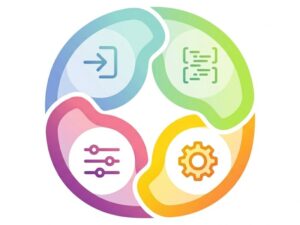
Describe.
The first step is to clearly describe the task. In a prompt, the developer describes what the code must do. A good prompt for coding should mention the programming language to use, frameworks, expected behavior & input or output.
For example, a developer can instruct the AI to write a Python script that reads data from a file and then generates a summary report. When given clear instructions, the AI is able to understand its problem.
As time passed, developers improved their prompts. With experience, detailers learn how to add better details, constraints, and examples. It is called prompt engineering and plays a major role in the successful coding of vibes.
Generate
After a prompt is issued, the code is generated by the AI to try & get the answer. The output can be functions, classes, or full modules, depending on the complexity of your request.
The code that has been produced is a base rather than a final product. To understand how code works, a developer reads the code to get a better understanding. AI outputs often have minor errors or inefficient logic for the specific use case, along with missing features.
Run
The subsequent step must be to execute code. Program execution is performed by developers to check whether it works as intended. Executing the code helps to uncover problems like syntax errors, wrong results, and performance issues.
Testing also enables developers to view how the code connects to real data. It is essential, for example, to ensure the generated code supplied by AI, although correct, can not run as required.
Refine
The last stage is fine-tuning the resolution. The programmer can either manually tweak the code when the output is incorrect or update the prompt for requesting changes from the AI.
This process might occur many times. With every iteration, we improve on the solution & the project advances. The refinement phase makes sure the final code is reliable, safe, & meets the developer’s original intention.
The application lifecycle (idea → build → validate → deploy)
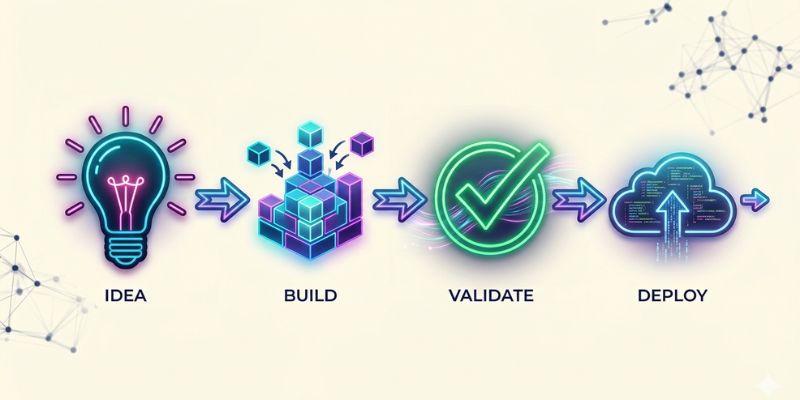
Application lifecycle can be supported with vibe coding, beyond an individual code prompt. The lifecycle explains how an idea becomes an actual software product used by customers or internal people. The stages in a process usually go through are: idea, build, validate & deploy.
Idea
The initial stage is the conception of ideas. The developers start this stage with an idea for the application they wish to develop and the problem they wish to solve. It outlines essential features that the software must possess.
AI tools can provide meaningful assistance during this stage in terms of potential architectures, early prototypes, and example code.
Build
Build the application for the next stage. At this stage, developers generate various components of the system using AI prompts. User interface components, backend APIs, database queries & even automation scripts will be included.
The prompt loop is frequently employed during the build phase of every feature created.
Validate
The application must be validated once built. The developers make a test of the system to ensure it functions accurately. Unit testing, performance testing & security tests are conducted in this stage.
The AI-generated code validation provides error detection before product release.
Deploy
The last part is deployment. After development, when applications are in a stage of production, the developers deploy them on a server or cloud. After it is deployed, the software will be available to users via web-based interfaces or any application.
“Vibe deploying” and why deployment is part of the workflow
What is vibe deploying
Vibe deploying makes use of AI to help with the deployment process of an application. Developers can ask AI systems to generate infrastructure configurations, setup commands, and CI/CD pipelines, instead of manually configuring servers and writing deployment scripts.
Why deployment is part of the workflow
According to the sources, deployment is part of the vibe coding workflow since modern AI tools can help with the whole coding cycle. Developers can go directly from writing prompts to launching software. As a result, applications can be released in less time, and teams can deliver quickly.
Real Example of Vibe Coding (Step-by-Step)
To move further theory, let’s have a look at practical example of how vibe coding works in a real world scenario. This will help you to understand how developers use prompts to generate workable code and refine it step by step.
Step 1: Write the Prompt
Instead of writing code manually, the developer explains the requirements in plain English or even in his own language like Spanish, German, Dutch or whatever its language is:
Build a React todo application with local storage. It will allow users to add and delete tasks, and the data should not be removed on page reload.
This prompt clearly defines:
- The framework (React)
- Core functionality (add and delete tasks)
- Storage requirement (local storage persistence)
Step 2: AI Generate Code
On behalf of the prompt, the AI generates an initial version of the application. Below is the example in code:
import React, { useState, useEffect } from “react”;
function TodoApp() {
const [tasks, setTasks] = useState([]);
const [input, setInput] = useState(“”);useEffect(() => {
const saved = JSON.parse(localStorage.getItem(“tasks”));
if (saved) setTasks(saved);
}, []);useEffect(() => {
localStorage.setItem(“tasks”, JSON.stringify(tasks));
}, [tasks]);const addTask = () => {
if (input) {
setTasks([…tasks, input]);
setInput(“”);
}
};const deleteTask = (index) => {
setTasks(tasks.filter((_, i) => i !== index));
};return (
<div>
<input value={input} onChange={(e) => setInput(e.target.value)} />
<button onClick={addTask}>Add</button>
<ul>
{tasks.map((task, i) => (
<li key={i}>
{task} <button onClick={() => deleteTask(i)}>Delete</button>
</li>
))}
</ul>
</div>
);
}export default TodoApp;
Step 3: Run and Test the Code
The developer runs the code in their IDE (Integrated Development Environment) like VS Code or any other code editor and checks:
- Tasks can be added
- Tasks can be deleted
- Data is saved even after refresh the page. because we are using local storage.
The application works, but it’s still basic. We can now add more feature or can improve UI.
Step 4: Modify According to needs
Now the developer improves the output with another prompt:
Improve the UI of the todo application and add a feature to mark tasks as completed.
The AI may:
- Improve styling
- Add a “completed” toggle feature
- Enhance layout and usability
The developer can also manually edit the code for better performance and structure.
Step 5: Final Results
Within a short time frame, the developer has:
- A functional React application
- Persistent data storage
- Improved UI and features
This process is much faster compared to writing everything from scratch.
Vibe coding tools landscape
The increasing prominence of vibe coding has given rise to a wide range of tools that assist developers to code, build & deploy faster. The systems and overall design of these tools employ advanced large language models and artificial intelligence techniques. This enables them to understand specific programming languages, frameworks, and development workflows.
During the early days of AI-assisted development, tools were largely designed to suggest colors and text in IDEs. The scenario is bigger today. Using these tools, teams can generate entire functions, construct full applications from prompts, and develop enterprise-level environments with the help of governance, security, and collaboration involvement.
As new software tools emerge, it can often be a problem that many developers face today – which tool is better? The choice you make depends on many things, like the complexity of your project, testing & privacy, or deploying the pipelines.
Developers will choose tools that support their natural workflow, rather than limit it if they know their. Most tools used for vibe coding can be categorized based on what they do. Before using any tool for an actual project, developers must evaluate it.
The main categories of tools, the most essential selection criteria, and which tools work best for which type of user are explained on the next pages.
Tool categories (codegen vs appgen vs enterprise)
Usually, vibe coding tools belong to three broad categories. Different categories focus on a different level of software development support.
Code generation tools (codegen)
Code generation tools mainly deal with isolated pieces of code. Often embedded in an IDE or code editor, they assist a programmer in the prompt development of methods, classes, or small modules. If developers require a specific function, they may ask AI to build or fix it, while they can also ask the AI to tell them what the existing code does.
People enjoy using Codegen tools when fitting into existing development workflows. Developers do not have to leave the editors they love to use AI for code, as suggestions are in the IDE. These tools consist of code that helps developers eliminate repetitive coding or speed up development.
Application generation tools (appgen)
Application generation tools function at a more elevated level. They help in making the full application instead of small code. The tool generates multiple components such as frontend interface (UI), backend service & database based on the product description provided by developers.
These tools feature visual interfaces, templates, and automations that simplify front-end development. Appgen platforms typically serve the purposes of prototyping, MVP & internal utilities.
Enterprise AI development platforms
Enterprise tools built for bigger teams and organizations. The focus of these platforms is their governance. It has integration with version control, access based on role, monitoring for compliance, and advanced deployment pipelines.
Larger companies often choose enterprise tools since they allow better control over data security and development workflows.
Selection criteria that matter for traffic readers (privacy, testing, deployment, lock-in)
Selecting a tool to code in a particular vibe is not only about features or popularity. Workers need to consider many important criteria when choosing the workflow platform. All of these aspects assist in ensuring that the selected tool aligns with long-term development goals.
Privacy and data protection
When using AI coding tools, privacy is one of the most serious concerns. Numerous tools execute prompts and code on distant servers. This means that sensitive project data could be disclosed to external systems.
Developers working on confidential applications must verify whether the tool offers local processing, private models, or enterprise-level data protection policies.
Testing and quality assurance support
This is another important capability. The coding tools we refer to as good vibes should come equipped with automated testing functions such as unit test generation, fault tolerance, and code analysis.
Tools that test enable testers to identify issues early on. AI-generated code may contain bugs that aren’t caught until later. When this occurs, they can be quite difficult to fix when there is no testing support in place.
Deployment and integration capabilities
Deployment pipelines need strong integration with modern development processes. Developers need to look into the compatibility of the tool for CI/CD systems and more.
Deployment system integration tools help quicken the transition from code generation to production.
Vendor lock-in risks
Developers must also consider vendor lock-in. Some platforms store their projects in proprietary environments, making it difficult to export the code and move to other tools.
Development tools must enable quick code export and connection with a standard development environment. This guarantees flexibility and avoids long-term dependence on one platform.
Quick “best for” matrix (beginners, devs, teams)
Vibe coding tools vary for different types of users. The top tool for an amateur may not be the best choice for an advanced developer or a bigger team.
Best for beginners
Tools that feature simple interfaces and guided workflows usually help beginners. These tools may have templates, tutorials, and auto-explanations of the code. They help novice developers grasp coding concepts while playing with AI solutions.
Best for individual developers
Most developers prefer to work within their own IDEs or tools. AI assistants that are integrated into IDEs allow developers to quickly generate code while remaining in the workflow. The instruments furnish adaptability yet remain productivity boosters.
Best for development teams
Teams and organizations need platforms that facilitate collaboration and governance. Enterprise-class essence software brings features for shared space version control, integrations & security policy.
By using these platforms, teams can ensure their development standards are met, even while benefiting from AI-assisted workflows.
In identifying and assessing the important selection criteria among the tool categories, developers can get their hands on the appropriate tool.
When vibe coding is a good idea (and when it’s not)
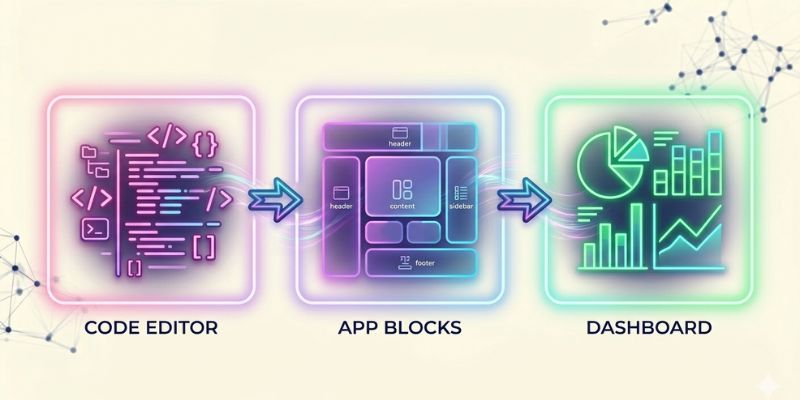
It is not appropriate for every project, but vibe coding can be an effective means of delivering software more quickly. The use of AI-assisted development can accelerate experimentation and build new features faster, although security, reliability & longevity issues may arise. As a result, developers should know when vibe coding is helpful and when a more orthodox development approach is more beneficial.
Often, using vibe codes works better when speed, experimentation, or getting feedback is the main goal. Developers quickly code, test ideas, and finalize features without spending weeks creating everything from scratch. This flexibility allows teams to explore new product concepts and provides chances for validating ideas earlier.
But there are also circumstances where vibe coding may not be ideal. Projects with rules or restrictions, complicated infrastructure, or sensitive user data require careful architecture and code review work. Using AI-generated code in such settings without a strong understanding and further validation is risky.
Developers can choose their development path by realizing Vibe Coding’s strengths and weaknesses. Next, we will discuss the types of projects that should use vibe coding and situations in which vibe coding might be used with caution or should even be avoided.
Good fits: prototypes, internal tools, learning, low-stakes apps
For projects in which speed and experimentation are prioritized over long-term complexity, vibe coding is effective. One of the most common use cases is prototyping. Entrepreneurs need a way to test-drive their concept without requiring a full-fledged product. Thanks to AI-enabled coding, developers can create a working prototype in a few hours or days to test products.
Internal tools present another compelling use case. A large number of companies build small applications for the automation of internal tasks such as data reporting, workflow management, document processing, etc. Typically, the tools have limited users and have a lower risk compared to public ones. This means that vibe coding can speed up development and still result in useful solutions.
Vibe coding can also be used for learning. Programming beginners can experiment with example codes through AI tools to check how different programming concepts are executed in real time. Instead of looking at complicated documents, the learner can run through the generated code and understand the logic step by step. This way of learning enables individuals to achieve more hands-on experience in shorter time frames.
Low-stakes applications also make a good category. The projects where the repercussions of error are pretty small. Personal Projects, Simple Automation Scripts, Experimental Web Apps, and Hobby Projects could all work. In such situations, the purpose is often creative and exploratory rather than strictly reliable.
When coding in these situations, developers can take advantage of speed, flexibility & rapid experimentation, Vibe coding’s biggest strengths.
Bad fits: regulated workflows, auth/payments, long-lived complex systems
While vibe coding can be useful, there are projects where it can create a big risk. It appears that one of the major concerns happens in regulated sectors such as finance, healthcare, and government systems. Software used in such environments must comply with stringent standards and security policies. The code generated by AI might not always pass a verification, requiring intense human re-verification.
The authentication and payment system is another tough area. Due to online threats, login management, password protection, and the payment process must be secured. Even the tiniest of errors in one of these chances could allow the exposure of user data or the occurrence of a vulnerability that an attacker can take advantage of. That’s why developers frequently use libraries that have been well-tested as well as code that has been reviewed.
Large, long-lived software systems may also struggle with vibe coding. Complex platforms often necessitate considerable architecture planning, rigorous design patterns, and a lot of documentation. If developers will overuse AI-generated code without proper structuring, it may complicate the project maintenance later.
For this type of project, vibe coding may still be useful for small tasks or early prototypes, but the final production system is usually engineered in the usual way and carefully tested under the oversight of an experienced developer.
Risks and guardrails (non-negotiable if you want credibility)
Although vibe coding is quick and flexible, it comes with significant risks that developers cannot ignore. Using AI-generated code without understanding it may create security problems, compliance issues & affect long-term, easy maintenance. Incorporating proper guardrails based on standards is key to credibility and safety. Anyone employing AI to assist in development projects is probably aware of the risks and safeguards.
In practice, vibe coding workflows are often applied under additional assumptions of correctness, efficiency, or security. Developers need to integrate their AI solutions with testing, code review, and secure development. Essentially, they can take advantage of code-assisted AI for their own use while shielding themselves and their user from harm.
Security risks (secrets, auth, injection, dependencies)
Security is our top most feedback for the AI assisted code generation system. One of the critical issues is secret management. Whether it is API keys, database passwords, and other secrets that may end up in prompting or storage. If others became aware of these secrets, they would be used against us. Developers should prevent secret leaks by implementing secret scanning and secure storage.
An additional issue involves vulnerabilities related to authentication and authorization. Artificial intelligence can produce code for login systems, role checks, or permission control systems that seem fine but have hidden bugs. Security flaws may allow unauthorized access or privilege escalation.
Injection attacks also involve a risk. Code used to manage user input may have no validation/sanitization, which could make your application vulnerable. Developers must conduct input reviews and enforce secure coding practices.
To sum up, the output from AI tools invariably has dependencies and supply chain risks. External libraries are often used for code generation. The risk is that libraries might become out-of-date; or vulnerable; or in some cases malicious. Dependency audits must be conducted and the check should select a reliable source and use automated security tools.
Governance and auditability issues
It is essential to govern and audit AI, but how? The automatic code generation by AI makes it hard to investigate the reason behind producing a certain solution or a reviewer. Organizations may face compliance or regulatory challenges without effective oversight.
It is crucial to specify code ownership and responsibility. AI interactions, any decisions made during the generation of AI outcomes, and manual alterations of the code should be documented by the developer. This documentation helps teams to justify the behavior of the code that they have implemented, useful in regulated environments.
Auditability difficulties additionally cover tracing dependencies, testing outputs, and security tests. When organizations do not keep complete records, they cannot prove their software meets standards or has passed reviews. Putting into place version control, automated logging, and internal review processes helps prevent these concerns.
Governance frameworks need teams to make policies on the use of data, model outputs, and prompts. Such policies ensure that sensitive information does not leak and that AI tools are used responsibly.
Guardrails mapped to standards (NIST SSDF, OWASP, SLSA)
Developers Aligning Code Flow With Standards To Effectively Manage Risks. The NIST SSDF (Secure Software Development Framework) provides guidelines on secure development of software, including threat modeling, secure coding & secure testing. By following these rules, vulnerabilities in AI-generated code are reduced.
OWASP Top 10 and ASVS (Application Security Verification Standard) are suitable for catching common security bugs in web applications. They offer practical checklists for injection, authentication & authorization risks about AI-assisted development.
SLSA means Supply-chain Levels for Software Artifacts & it focuses on supply chain security. It assists organizations in confirming the integrity of dependencies, tracing their origin, and avoiding malicious modifications made to third-party libraries.
Developers can create a safe space for vibe coding by configuring guardrails around the standards. The development of AI-assisted will be safe, reliable & secure to use as well as govern and dependent.
Looking to build AI-powered applications faster? Bit code Solution can help you turn your ideas into scalable, high-performance solutions.
FAQs
What is vibe coding in simple words?
Vibe coding is the way to generate code using a prompt and iteratively refine it using AI. A prototyping environment allows you to create prototypes, internal tools, and projects to learn faster.
Who Invented the Term Vibe Coding?
Though no specific person is credited for coining the term, the AI development community began using it around 2022-2023. It stems from a synthesized workflow for programming that makes use of prompts and LLM code generation assistants.
Are vibe coding and no-code the same?
No. Vibe coding requires some programming knowledge, unlike no-code. Programmers provide AI guidance through prompts and code corrections.
Which are the top vibe coding tools for beginners?
Copilot, Replit AI, Claude Code, Google Ai Studio, Emergent, Cursor, GitHub Copilot and Codeium are easy to use for starters. Offers prompts, code suggestions and visual guidance to aid learning.
Is vibe coding safe for use in production?
It is possible, but only with rigorous testing, code examination, and security enforcement. Code generated by AI might have bugs, insecure or outdated functionality.
What does vibe deploying mean?
Vibe deployment involves AI-assisted launching and configuring applications. It simplifies deployment processes such as infrastructure configuration & continuous integration & deployment pipelines.